Role-based team permissions
Separate owner, admin, and member responsibilities so sensitive actions stay controlled while daily collaboration remains fast.
Feature
Manage collaboration with role-based permissions, scoped invite links, and shared visibility so product and engineering teams can move quickly with clear boundaries.
Separate owner, admin, and member responsibilities so sensitive actions stay controlled while daily collaboration remains fast.
Create invite links with expiry and usage limits to onboard teammates safely without overexposing workspace access.
Keep team activity and usage aligned to workspace responsibilities, improving accountability during delivery and handoff.
As more people contribute to synthetic data workflows, access governance becomes part of product velocity. Team workflow controls make collaboration smoother by assigning clear permission levels and reducing ambiguity around who can manage sources, credentials, and workspace settings.
Instead of treating access as an afterthought, teams can define operational boundaries from the start.
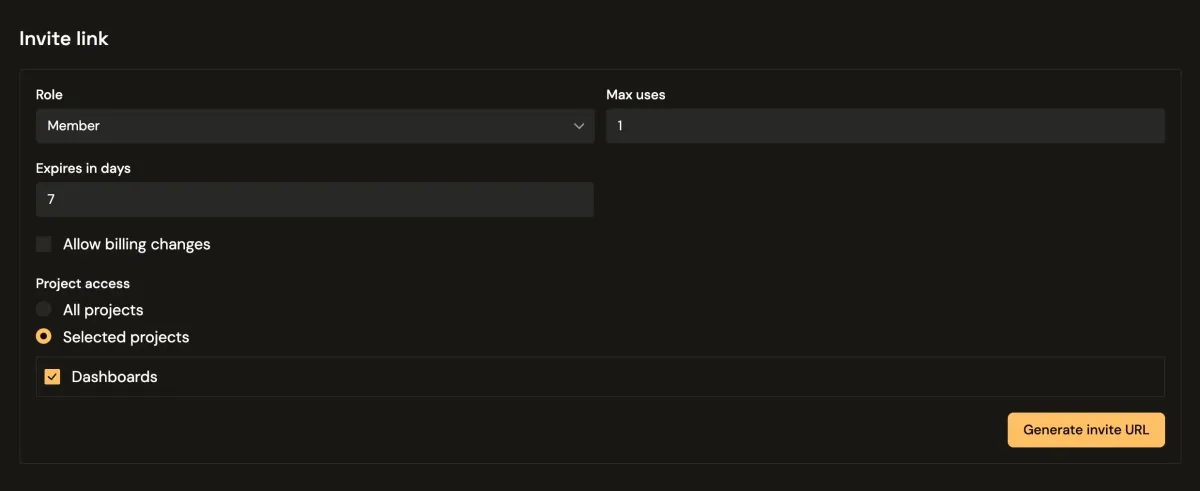
Owner, admin, and member roles support different responsibilities without forcing one broad permission set for everyone. This keeps high-impact actions constrained while allowing contributors to work independently on day-to-day setup and validation tasks.
As teams grow, role separation reduces accidental changes and keeps workflows consistent across environments.
Invite links with explicit expiry windows and usage caps give teams a lightweight but controlled way to onboard users. This is useful for temporary collaborators, consultants, or short-term QA support where permanent account privileges are unnecessary.
Scoped invites also improve hygiene by reducing orphaned access over time.
When permissions and invites are structured, delivery workflows become easier to coordinate. Teams spend less time resolving access confusion, reduce operational risk from over-privileged accounts, and maintain momentum during cross-functional release cycles.
To explore how this works alongside schema, generation, and runtime capabilities, visit the full features overview or pricing for plan-level limits.
Use this playbook as your starting point, then compare other solution tracks or plan limits for your rollout.